
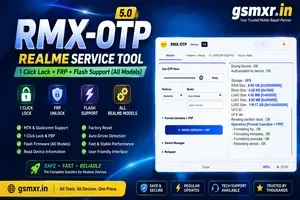
REALME OTP ( RMXOTP )-MTK Qualcomm 1 Click Lock +FRP - Instant USe OTP Dont Srock
Manage your tools and account from this resource access hub.
Instant USe OTP Dont Srock
⚠️ Important Refund Policy — Please Read Carefully
🔹 Once OTP is used → NO REFUND tool password 123
After the OTP is generated and used, no refund will be provided — regardless of the result.
🔹 Once authentication starts → NO REFUND for any kind of issue:
❌ Fail at 10% / 20% / 60%
❌ Wrong file selected
❌ Phone disconnected
❌ Driver issue
❌ Wrong region / wrong model
❌ Tool crash / PC restart
❌ Network error
➡️ No refund in any of these cases.
🔹 Before starting, please check everything properly:
✅ Correct model & region
✅ Stable cable & drivers
✅ Good internet connection
✅ Sufficient battery
⸻
📱 MTK Notice:
Make sure MTK driver is installed before flashing.
If flashing fails while the device is connected to the VCOM port, it will be at your own risk.
🧠 Before placing an order, connect your phone to the PC once and confirm it shows as
👉 “MTK Preloader -1632” in Device Manager.
⚠️ No OTP refund will be provided for driver or port issues.
RMX OTP Realme (MTK & Qualcomm) – 1 Click Lock + FRP & Flash Tool Complete Guide (All Models)
RMX OTP Realme (MTK & Qualcomm) 1 Click Tool – Lock, FRP & Flash Support
RMX OTP Realme Tool is a professional servicing solution designed for mobile repair technicians. It supports a wide range of Realme smartphones powered by both MediaTek (MTK) and Qualcomm chipsets. The tool provides an easy interface for supported servicing operations such as firmware flashing, device information reading, factory reset, and other maintenance functions available for compatible devices.
If you're looking for a reliable Realme flashing solution, RMX OTP Tool offers compatibility with many Realme models while providing a simple one-click workflow for supported operations.
Key Features
-
Supports MTK & Qualcomm Realme Devices
-
One-Click Flash Support
-
Factory Reset (Supported Models)
-
Read Device Information
-
Auto Driver Detection
-
Fast USB Communication
-
Secure Server Login
-
Firmware Flash Support
-
Easy User Interface
-
Regular Model Updates
Model support depends on the current tool version.
Requirements
Before using RMX OTP Tool, ensure you have:
-
Windows 10/11 (64-bit)
-
Stable Internet Connection
-
Realme USB Driver
-
MTK USB Driver
-
Qualcomm USB Driver
-
Original USB Cable
-
Compatible Firmware Package
-
Valid RMX OTP Login/Activation
How to Use RMX OTP Realme Tool
Step 1 – Install Drivers
Install all required USB drivers before connecting the phone.
-
MTK USB Driver
-
Qualcomm HS-USB QDLoader Driver
-
Realme USB Driver
Restart your PC after installation.
Step 2 – Login
Open RMX OTP Tool as Administrator.
Enter your activation credentials.
Wait until the server displays Connected or Online.
Step 3 – Connect Device
For MTK Phones
-
Power OFF the phone.
-
Hold Volume Up + Volume Down.
-
Connect USB Cable.
-
Wait for device detection.
For Qualcomm Phones
-
Power OFF the device.
-
Enter the supported service mode for your model.
-
Connect USB.
-
Wait for successful detection.
Step 4 – Select Operation
Depending on the supported model, the tool may offer functions such as:
-
Read Device Information
-
Flash Firmware
-
Factory Reset
-
Reboot Device
Select the desired operation and wait until the process completes successfully.
Flashing Firmware
-
Download the correct firmware.
-
Click Browse.
-
Select firmware.
-
Click Start Flash.
-
Wait until PASS or Success appears.
Common Errors & Solutions
Device Not Detected
-
Reinstall USB Drivers
-
Change USB Port
-
Use Original Cable
Login Failed
-
Check Internet
-
Verify Activation
Server Busy
-
Retry after a few minutes
Firehose/Sahara Error
-
Use the correct firmware for the exact model.
Tips
-
Charge battery above 50%.
-
Always use firmware matching the exact device model.
-
Back up important data before flashing because the process may erase user data.
-
Perform servicing only on devices you own or are authorized to repair.
Frequently Asked Questions
Is RMX OTP Tool free?
No. A valid activation or reseller login is generally required.
Does it support all Realme phones?
Support varies by tool version and the specific device model.
Can I flash stock firmware?
Yes, on supported models using compatible firmware packages.
Does it support MTK and Qualcomm?
Yes, compatible versions support both chipset platforms.
Conclusion
RMX OTP Realme Tool is a useful servicing utility for technicians working with Realme smartphones. With support for MTK and Qualcomm devices, a straightforward interface, and firmware flashing capabilities on supported models, it helps streamline common repair workflows. Always verify that your device and firmware are compatible with the current tool version before starting any service operation.
RMX OTP Tool, RMX OTP Realme, Realme Flash Tool, Realme MTK Flash Tool, Qualcomm Flash Tool, Realme Firmware Flash, Realme Service Tool, RMX OTP Download, Realme USB Tool, Realme Repair Software.
Best Mobile Repairing Tools aur Files Kahan se lein?
Professional kaam ke liye hamesha trusted files aur support ki zaroorat hoti hai. GSMXR ENTERPRISES aapko provide karta hai:
-
Realme All Model OTP Support
-
Tested Flash Files & Tools
-
Remote Technical Support
Buy Service & Tools:
Website: www.gsmxr.in | www.gsmxr.com
WhatsApp Support: +91 9289915006
Email: INFO.GSMXR@GMAIL.COM
-
GRT OTP Realme (QC-MTK 1 Click All Cpu) FRP REMOVE (Instant USe) Dont Stock
4.5 USD Instant Instant -

Xiaomi Power Tool - ( XPT OTP Realme ) MTK qualcomm 1 Click- Pin FRP (SAME DAY USE) Dont Stock
6 USD Instant -

REALME OTP -MTK Qualcomm 1 Click Lock +FRP Remote Work
5.9 USD instant -
![UNLOCKTOOL (6h)-[instant-Auto API 24x7]](/media/rent.webp)
UNLOCKTOOL (6h)-[instant-Auto API 24x7]
0.56 USD Rental 6 hour