
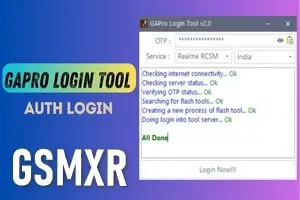
GAPro OTP Realme MTK 1 click pin frp Unlock
GAPro OTP: Realme MTK 1-Click PIN & FRP Unlock — gsmxr.in
The GAPro Tool (also known as GAPro Login Tool) is a specialized server-side solution for Realme, Oppo, and OnePlus devices. It is highly effective for "1-Click" operations, especially on newer Android 15 and 16 security patches, using an OTP (One-Time Password) to authorize the connection.
Process Overview (MTK 1-Click)
To successfully remove a PIN, Pattern, or FRP lock without a full flash, follow these steps precisely:
-
Driver Setup: Ensure you have the latest MediaTek (MTK) USB VCOM drivers installed. Filter the port using LibUSB to ensure the tool catches the device instantly.
-
Tool Selection: Open the GAPro Login Tool and navigate to the Realme/Oppo MTK section.
-
OTP Authorization: * Click the OTP request button or input the OTP purchased from gsmxr.in.
-
Select the option: Factory Reset + FRP (to remove both PIN and Google lock in one go).
-
-
Connection: * Power off the device completely.
-
Hold Volume Up + Volume Down and insert the USB cable.
-
The tool will verify the OTP with the server and complete the operation in roughly 30–60 seconds.
-
Strict Policy: No Refund & No Replacement
Because GAPro uses a server-side OTP/Token system, the following rules apply to all orders:
-
OTP Consumption: One OTP is valid for one successful login/operation on one device.
-
Wrong Process = No Refund: If the process fails due to poor internet, faulty cables, or incorrect drivers after the OTP has been entered, the server counts it as a used credit.
-
Model Support: Not all models are supported for 1-click. Always check the current model list in the tool before using your OTP.
-
Non-Replaceable: Once an OTP is issued, it cannot be replaced or refunded if the technician makes a mistake.
Troubleshooting Common Errors
| Error | Cause | Solution |
| Invalid OTP | Typing error or expired token | Copy-paste the OTP directly from gsmxr.in to avoid typos. |
| BROM Error / Timeout | Driver or Cable issue | Change your USB cable; ensure the device is in BROM mode (Vol +/-). |
| Server Offline | Maintenance | Check the GAPro server status indicator in the tool before clicking "Start". |
| Handshake Failed | Security Patch Mismatch | Some very new 2026 security patches may require a full "Auth Flash" instead of 1-click. |
Technical Advice
-
Charging: Ensure the phone has at least 30% battery to maintain the server handshake.
-
Stable Internet: A high-speed connection is mandatory to prevent the OTP from timing out during verification.
-
One Device Rule: Do not attempt to use the same OTP for two different phones; the server will block the second attempt and void the credit.
For instant GAPro OTP delivery and the latest mobile repair tools, visit gsmxr.in.
-

RealmeFix Tools (1 Click) MTK+Qualcomm All Support (7 Days) Token Expire
100.35 USD Instant -

Realme Oppo Oneplus DEMO Remove Tool | 1 PC LifeTime Activation
10 USD iNSTANT -
![Adam Tool Credit For Xiaomi/OnePlus/Realme [Existing User]✅](/media/activation-tool-gsmxr-in.png)
Adam Tool Credit For Xiaomi/OnePlus/Realme [Existing User]✅
0.64 USD Miniutes -
GLOBAL AUTH TOOL MTK/QUALCOMM Flash/EFS/Mi Cloud Credit
0 USD Miniutes