
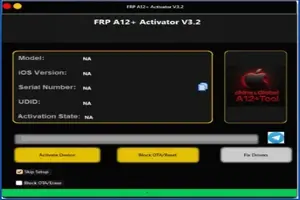
FRP A12+Activator✅️4s to 17 Pro Max All iPads-IOS-12.14.15.17.18.7.2-up to-26.1 (No Refund)
Manage your tools and account from this resource access hub.
❗ NO SiM - NO REJECT - NO REFUND
A12+ Bypass✅
📱4s to 17 Pro max📱
🟢ios Supported✅
⚙️ iOS Support Version:🟢
➕ 14.15.8.5 🔥
➕ 16.7.12
➕ 17.4.1
➕ 17.5.1
➕ 17.6.1
➕ 18.2
➕ 18.3 / 18.3.1 /18.3.2
➕ 18.4 / 18.4.1
➕ 18.5
➕ 18.6 / 18.6.2
➕ 18.7.1 / 18.7.2
➕ 26.0 / 26.0.1 / 26.1
100% Tested Version 💥
🔔 SUPPORTED IOS VERSION FOR A5 DEVICES
✅ iPad Mini 1 ➡️ 9.3.5 ONLY
✅ iPad 2 ➡️ 9.3.5 ONLY
✅ iPad 3 ➡️ 9.3.5 ONLY
✅ iPhone 4 ➡️ 7.1.2 ONLY
✅ iPhone 4s ➡️ 9.3.5 and 9.3.6 BOTH
✅ iPod Touch 5 ➡️ 9.3.5 ONLY
SUPPORTED MODELS
✅ iPad Mini 1
✅ iPad 2
✅ iPad 3
✅ iPod Touch 5
✅ iPhone 4
✅ iPhone 4s
Fast Simple Trusted
🔓 Unlock iCloud Hello Screen Without Signal – Fast & Secure
FRP A12+ Activator is a powerful Windows-based iCloud bypass tool designed to remove the Hello Screen / Activation Lock from Apple devices without SIM signal. It supports a wide range of iPhones (6s to iPhone 17 Pro Max) and all iPad models, making it an all-in-one solution for technicians and repair professionals.
This tool is specially optimized for A12 and above devices, delivering a smooth, stable, and safe bypass process with high success rates.
✅ Supported Devices
📱 iPhone Models
-
iPhone 6s / 6s Plus
-
iPhone 7 / 7 Plus
-
iPhone 8 / 8 Plus
-
iPhone X / XR / XS / XS Max
-
iPhone 11 / 11 Pro / 11 Pro Max
-
iPhone 12 / 12 Mini / 12 Pro / 12 Pro Max
-
iPhone 13 / 13 Mini / 13 Pro / 13 Pro Max
-
iPhone 14 / 14 Plus / 14 Pro / 14 Pro Max
-
iPhone 15 / 15 Pro / 15 Pro Max
-
iPhone 17 Pro Max
📲 iPad Models
-
iPad (All Generations)
-
iPad Mini (All Models)
-
iPad Air (All Models)
-
iPad Pro (All Models)
⭐ Key Features
-
✔️ Hello Screen / iCloud Activation Lock Bypass
-
✔️ No Signal Required
-
✔️ Supports A12+ Chipset Devices
-
✔️ Windows PC Tool
-
✔️ Fast & Easy Process
-
✔️ High Success Rate
-
✔️ Safe & Stable Tool
-
✔️ Professional Repair Solution
💻 System Requirements
-
OS: Windows 10 / Windows 11
-
iTunes Installed (Latest Version Recommended)
-
USB Cable (Original or High Quality)
-
Stable Internet Connection
🔧 How to Use FRP A12+ Activator Tool
-
Download and install FRP A12+ Activator on your Windows PC
-
Connect your iPhone or iPad using a USB cable
-
Put the device into required mode (as guided by the tool)
-
Click Start Bypass
-
Wait for the process to complete
-
Device will boot without Hello Screen
🚀 Why Choose FRP A12+ Activator?
-
Trusted by mobile technicians worldwide
-
Works on latest iOS versions
-
Regular updates & bug fixes
-
Ideal for service centers and resellers
-
Time-saving & cost-effective solution
FRP A12+ Activator — gsmxr.in
The FRP A12+ Activator is a versatile Windows-based solution designed to bypass the iCloud Activation Lock (Hello Screen) on a massive range of Apple devices. This tool is uniquely engineered to support legacy hardware starting from the iPhone 4s all the way up to the latest iPhone 17 Pro Max.
Extensive iOS & Device Compatibility
This tool is built to handle multiple generations of Apple security protocols across various iOS versions:
-
iOS Support: Comprehensive coverage for iOS 12.0, 14, 15, 17, 18.7.2, and up to iOS 26.1.
-
iPhone Models: * Legacy: iPhone 4s, 5, 5c, 5s, 6, 6 Plus, 6s, 6s Plus, SE (1st Gen).
-
Mid-Range: iPhone 7, 7 Plus, 8, 8 Plus, X.
-
A12+ Modern: iPhone XS, XS Max, XR, 11, 12, 13, 14, 15, 16, and iPhone 17 Pro Max.
-
-
iPads: All iPad models including iPad Air, iPad Mini, and iPad Pro (M1, M2, M3, and M4 variants).
Key Features
-
No Signal Bypass: This is a WiFi-only bypass (No Signal/No Calls). It allows full access to the device features, apps, and settings, making it an excellent choice for gaming, media playback, or tablets.
-
Windows Native: Runs directly on Windows (Windows 10/11 recommended) without the need for a Mac.
-
Untethered: The bypass remains active after a restart. (Only a factory reset or full restore will return the device to the Hello screen).
-
OTA & Reset Blocker: Many versions of this tool include built-in options to disable "Software Updates" and "Erase All Content" to prevent accidental re-locking.
Strict Service Policy
-
No Refund: Once the Serial Number (SN) or IMEI is registered on the activation server via gsmxr.in, the process is Final and Non-Refundable.
-
Mandatory Check: Always use the "Check Device" button within the activator software before purchasing credits to ensure your specific hardware and iOS version are supported.
-
No Network Support: This service specifically bypasses the activation lock and does not provide cellular signal for calls or mobile data.
How to Use at gsmxr.in
-
Preparation: Ensure your device is on the "Hello" screen. Use a high-quality USB cable and install the latest Apple drivers on your PC.
-
SN Registration: Open the tool, copy the device Serial Number, and register it on the gsmxr.in server.
-
Bypass Execution: Once the SN is authorized, click the "Bypass" or "Activate" button in the tool.
-
Finish Setup: The device will reboot. You can then skip the activation steps and set up the device as new.
For the most reliable activation services and daily tool updates, visit gsmxr.in.
-
-
FRP Activator New Hello Screen iPhone (Not Done reject accepted) 4s to 17 Pro Max 12.14.15 up to iOS 26.1
5.5 USD Instant -
![UNLOCKTOOL (6h)-[instant-Auto API 24x7]](/media/rent.webp)
UNLOCKTOOL (6h)-[instant-Auto API 24x7]
0.56 USD Instant -

Realme Otp (UK-Tools)-1 Click- Qualcomm MTK All Unlock FRP Flashing (15 Days) Token Expire
1 USD Instant -
Android Multitool Tool Rent (AMT TOOL) (1-2h)-[instant-Auto API 24x7]
0.52 USD Instant